Post
Top 5 iPad Accessories to Maximize Your Work Productivity
Jun
Top 5 iPad Accessories to Maximize Your Work Productivity
Introduction
Top 5 iPad Accessories
The iPad has evolved into a powerful productivity device capable of handling everything from document editing and video conferencing to graphic design and project management. With Apple’s powerful processors, intuitive iPadOS features, and support for professional applications, many users now rely on an iPad as their primary work device.
However, the right accessories can significantly enhance your workflow. Whether you’re a student, business professional, content creator, or remote worker, investing in quality accessories can improve comfort, efficiency, and versatility.
This guide explores the five best iPad accessories that can help transform your tablet into a capable productivity workstation.
Learn more about Apple’s official iPad accessories:
Why Accessories Matter for Productivity


While the iPad is highly capable on its own, accessories unlock additional functionality that makes everyday work easier.
The right accessories can help you:
- Type faster
- Take handwritten notes
- Improve ergonomics
- Expand connectivity
- Increase storage flexibility
- Create a desktop-like workspace
These upgrades are especially valuable if you spend several hours each day working on your iPad.
1. Magic Keyboard
The Magic Keyboard is arguably the most important productivity accessory for serious iPad users.
Why It’s Worth It
It transforms the iPad into a laptop-like device by providing:
- Full-size backlit keyboard
- Multi-touch trackpad
- Adjustable viewing angles
- USB-C pass-through charging
- Comfortable typing experience
Best For
- Writers
- Students
- Business professionals
- Remote workers
- Anyone who frequently types emails or documents
Although it is one of the more expensive accessories, it offers one of the biggest improvements in day-to-day productivity.
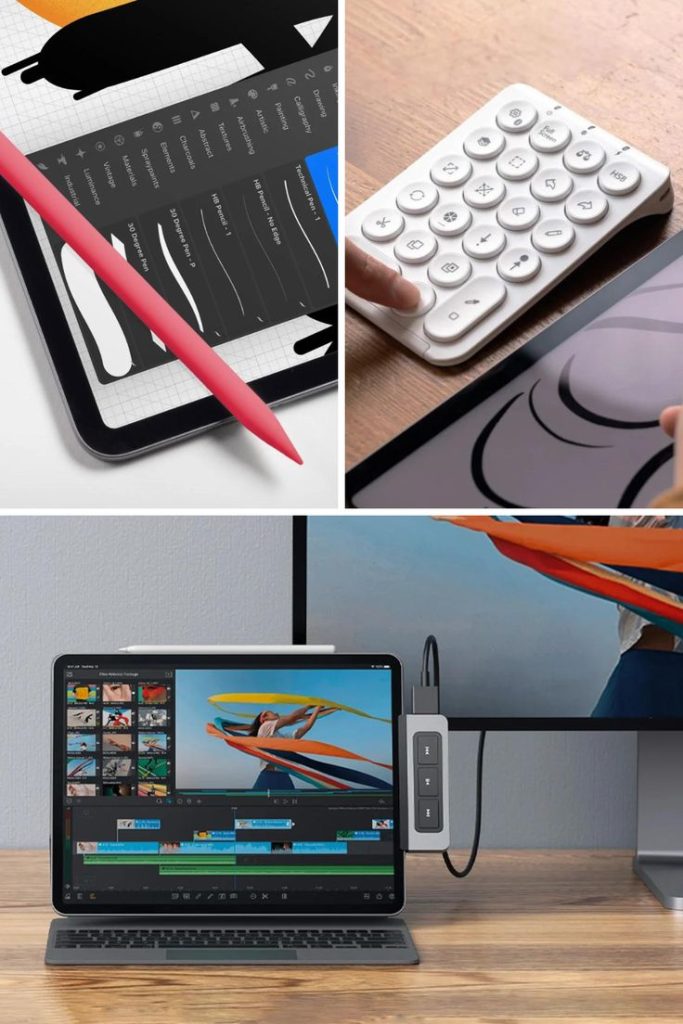
2. Apple Pencil Pro


The Apple Pencil Pro is much more than a drawing tool.
Productivity Benefits
- Handwritten notes
- PDF annotation
- Document markup
- Brainstorming
- Sketching diagrams
- Digital signatures
Ideal Users
- Students
- Architects
- Engineers
- Designers
- Teachers
- Business professionals
Apps such as Goodnotes and Notability become even more powerful when paired with the Apple Pencil Pro.
3. USB-C Hub or Multiport Adapter
Modern workflows often require more connectivity than an iPad alone provides.
A quality USB-C hub allows you to connect:
- External SSDs
- USB flash drives
- HDMI displays
- Ethernet cables
- SD cards
- Wired keyboards and mice
Benefits
- Faster file transfers
- Dual-display presentations
- Improved desktop workflows
- Better compatibility with office equipment
This accessory is especially useful for professionals who frequently work with external storage or presentations.
4. External SSD


As projects become larger, internal storage fills quickly.
A portable external SSD offers:
- High-speed file transfers
- Secure backups
- Expanded storage
- Better organization
Creative professionals working with:
- 4K video
- RAW photos
- Large design files
- Project archives
will especially appreciate the additional storage capacity.
5. Adjustable Tablet Stand
An adjustable stand dramatically improves comfort during long work sessions.
Advantages
- Better viewing angles
- Improved posture
- Reduced neck strain
- Easier video conferencing
- More comfortable typing when paired with a keyboard
Many stands also fold flat, making them easy to carry between home, school, and the office.
Bonus Accessories Worth Considering
Depending on your workflow, these accessories can also be valuable:
Bluetooth Mouse
Provides desktop-like navigation for users who prefer a traditional pointing device.
Wireless Earbuds
Products such as AirPods Pro offer clear audio for meetings, online classes, and calls.
Portable Power Bank
Useful for travel or long workdays away from power outlets.
Screen Protector
A matte, paper-like screen protector can improve the writing experience for Apple Pencil users while helping protect the display.
Choosing Accessories Based on Your Workflow
Students
Recommended:
- Apple Pencil Pro
- Tablet stand
- Magic Keyboard
Remote Workers
Recommended:
- Magic Keyboard
- USB-C hub
- Wireless earbuds
Designers and Artists
Recommended:
- Apple Pencil Pro
- External SSD
- Adjustable stand
Business Professionals
Recommended:
- Magic Keyboard
- USB-C hub
- External SSD
Selecting accessories based on how you actually use your iPad ensures you get the best return on your investment.
Tips to Build an Efficient iPad Workspace
To maximize productivity:
- Keep frequently used accessories within easy reach.
- Use cloud storage to synchronize files across devices.
- Pair your iPad with an external monitor when working at a desk.
- Organize your apps into folders for faster access.
- Regularly back up important documents to external storage or the cloud.
These small habits can make your iPad workflow smoother and more efficient.
Quick Comparison Table
| Accessory | Best For | Key Benefit |
|---|---|---|
| Magic Keyboard | Typing and multitasking | Laptop-like experience |
| Apple Pencil Pro | Notes and creative work | Precision writing and drawing |
| USB-C Hub | Connectivity | Supports external devices and displays |
| External SSD | Storage | Fast backups and additional capacity |
| Adjustable Tablet Stand | Ergonomics | More comfortable long-term use |
Conclusion
The iPad is already a capable productivity device, but the right accessories can unlock its full potential. A Magic Keyboard provides a comfortable typing experience, the Apple Pencil Pro enables precise note-taking and creative work, a USB-C hub expands connectivity, an external SSD offers reliable storage for large projects, and an adjustable stand improves ergonomics during extended work sessions.
Whether you’re attending online classes, managing business tasks, creating digital artwork, or working remotely, investing in accessories that match your workflow can make your iPad faster, more versatile, and significantly more comfortable to use. Rather than buying every accessory available, focus on the tools that solve your daily challenges and help you work more efficiently.
