Post
How to Properly Maintain Your Smartphone and iPad Battery Health
Jun
How to Properly Maintain Your Smartphone and iPad Battery Health
Introduction Maintain Your Smartphone and iPad Battery Health
Modern smartphones and tablets have become essential tools for communication, work, entertainment, education, and creativity. Whether you use a flagship smartphone, a gaming phone, or an iPad, battery performance plays a major role in the overall user experience.
Unfortunately, many people unknowingly adopt charging habits that accelerate battery degradation. Over time, poor battery care can lead to shorter screen-on times, slower performance, unexpected shutdowns, and costly battery replacements.
The good news is that today’s lithium-ion batteries can remain healthy for years when properly maintained. By understanding how batteries work and following a few practical habits, you can maximize battery lifespan and maintain consistent performance.
For official battery information and support, visit:
Apple Battery Service and Recycling
Understanding How Modern Batteries Work


Most smartphones and tablets use lithium-ion batteries.
These batteries offer:
- High energy density
- Fast charging capability
- Lightweight construction
- Long operational life
However, all lithium-ion batteries gradually degrade over time.
Battery aging is influenced by:
- Charging habits
- Temperature
- Usage patterns
- Charging frequency
- Device age
While degradation cannot be completely prevented, it can be significantly slowed.
Why Battery Health Matters
Battery health affects more than just runtime.
A healthy battery provides:
- Longer screen-on time
- Stable device performance
- Better gaming experience
- Improved reliability
- Reduced replacement costs
As battery capacity declines, devices often need more frequent charging and may experience performance limitations.
1. Avoid Extreme Battery Levels
One of the most effective ways to preserve battery health is avoiding frequent extremes.
Avoid Regularly Reaching 0%
Completely draining a lithium-ion battery places additional stress on its cells.
Occasional deep discharges are fine, but daily use should avoid reaching 0%.
Avoid Constantly Staying at 100%
Keeping a battery fully charged for extended periods can accelerate aging.
Ideal Daily Range
Most battery experts recommend maintaining charge levels between:
20% and 80%
This range generally reduces long-term battery wear.
2. Heat Is the Biggest Enemy
Temperature has a major impact on battery lifespan.
Common Heat Sources
- Gaming while charging
- Direct sunlight
- Hot vehicles
- Fast charging for extended periods
- Heavy multitasking
Why Heat Matters
Excessive heat accelerates chemical aging inside lithium-ion batteries.
Over time, this permanently reduces capacity.
Best Practice
Keep devices as cool as reasonably possible during heavy workloads.
3. Be Smart About Fast Charging


Fast charging is convenient but generates additional heat.
Should You Avoid Fast Charging?
No.
Modern smartphones and tablets are designed to handle fast charging safely.
Better Approach
Use fast charging when necessary, such as:
- Busy workdays
- Travel
- Emergencies
For overnight charging or routine use, standard charging may generate less heat.
4. Use Quality Chargers and Cables
Low-quality charging accessories can cause:
- Unstable power delivery
- Excessive heat
- Charging inefficiencies
Recommended Options
Use:
- Original manufacturer chargers
- Certified third-party accessories
- Reputable charging brands
Quality charging equipment helps ensure safe and consistent battery performance.
5. Enable Battery Optimization Features
Modern devices include software tools designed to protect battery health.
On iPhone and iPad
Features such as:
- Optimized Battery Charging
learn your charging habits and reduce unnecessary time spent at 100%.
On Android
Many manufacturers provide:
- Adaptive charging
- Smart charging limits
- Battery protection modes
These features are worth enabling whenever available.
6. Avoid Intensive Gaming While Charging


Gaming is one of the most demanding tasks for modern mobile devices.
When gaming while charging:
- CPU temperatures rise
- GPU temperatures rise
- Battery temperatures rise
This combination creates substantial heat.
Better Approach
Whenever possible:
- Charge before gaming
- Charge after gaming
- Use cooling accessories for extended sessions
Reducing thermal stress improves long-term battery longevity.
7. Keep Software Updated
Manufacturers frequently improve battery management through software updates.
Benefits may include:
- Better charging efficiency
- Reduced background activity
- Improved thermal management
- Enhanced battery optimization
Keeping your device updated helps maintain overall battery performance.
8. Reduce Unnecessary Heat-Producing Activities
Some habits create constant background heat.
Examples include:
- Excessive brightness
- Poor cellular signal areas
- Constant GPS usage
- Multiple background applications
Helpful Adjustments
- Lower screen brightness when possible
- Use Wi-Fi when available
- Close unnecessary applications
- Enable power-saving features when appropriate
9. Store Devices Properly
If you won’t use a device for an extended period:
Recommended Storage Level
Store at approximately:
50% battery charge
Avoid
- Fully charged storage
- Fully discharged storage
Storage Environment
Choose:
- Cool
- Dry
- Temperature-controlled locations
Proper storage helps preserve long-term battery health.
10. Understand Battery Cycles
Battery wear is often measured in charge cycles.
A cycle represents using battery power equal to 100% of capacity.
Example:
- 50% used today
- 50% used tomorrow
Equals one cycle.
Modern devices are designed to withstand hundreds of cycles while maintaining good capacity.
Battery aging is normal and expected.
Battery Health Tips for iPhone and iPad Users
Enable Optimized Charging
Available on many Apple devices.
Avoid Extreme Temperatures
Apple recommends avoiding prolonged exposure to excessive heat.
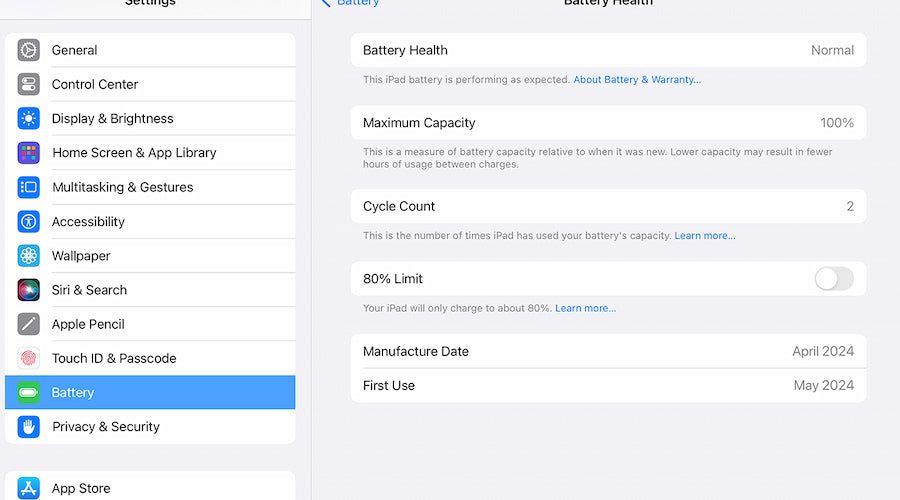
Check Battery Health
Many iPhones allow users to monitor battery condition directly in settings.
Monitoring battery health can help identify when service may eventually be needed.
Battery Health Tips for Android Users
Android manufacturers often include battery protection tools.
Common features include:
- Charging limits
- Adaptive charging
- Battery optimization modes
Explore your device settings to enable these protections.
Many flagship Android phones now allow charging limits around 80–85% for improved longevity.
Common Battery Myths
Myth: You Must Fully Drain the Battery
False.
Modern lithium-ion batteries do not require regular deep discharges.
Myth: Charging Overnight Always Damages Batteries
False.
Most modern devices intelligently manage overnight charging.
However, keeping a battery at 100% continuously may contribute to long-term aging.
Myth: Closing Every App Saves Significant Battery
Generally false.
Modern operating systems manage memory efficiently.
Excessively force-closing apps may actually increase power consumption in some situations.
Myth: Fast Charging Immediately Ruins Batteries
False.
Heat—not fast charging itself—is the primary concern.
Modern devices include safeguards designed to manage charging safely.
Signs Your Battery May Need Replacement
Common symptoms include:
- Rapid battery drain
- Unexpected shutdowns
- Significant overheating
- Reduced screen-on time
- Swollen battery (requires immediate attention)
If these symptoms become severe, professional battery replacement may be necessary.
Best Daily Battery Health Routine
A practical routine includes:
✔ Keep battery between 20–80% when possible
✔ Avoid excessive heat
✔ Use quality chargers
✔ Enable battery optimization features
✔ Avoid heavy gaming while charging
✔ Keep software updated
✔ Store devices properly when unused
✔ Avoid unnecessary thermal stress
These habits can significantly extend battery lifespan.
Conclusion
Maintaining battery health is one of the simplest ways to extend the life of your smartphone or iPad. While lithium-ion batteries naturally degrade over time, proper charging habits, temperature management, quality charging accessories, and built-in optimization features can dramatically slow the aging process.
By keeping charge levels within a reasonable range, minimizing heat exposure, avoiding intensive charging-related stress, and following manufacturer recommendations, you can enjoy longer battery life, better performance, and fewer battery-related issues for years to come. A small amount of attention to battery care today can save both money and frustration in the future while helping your devices perform at their best.
